

添加新命令
目前,Hummingbot 支持以下命令:
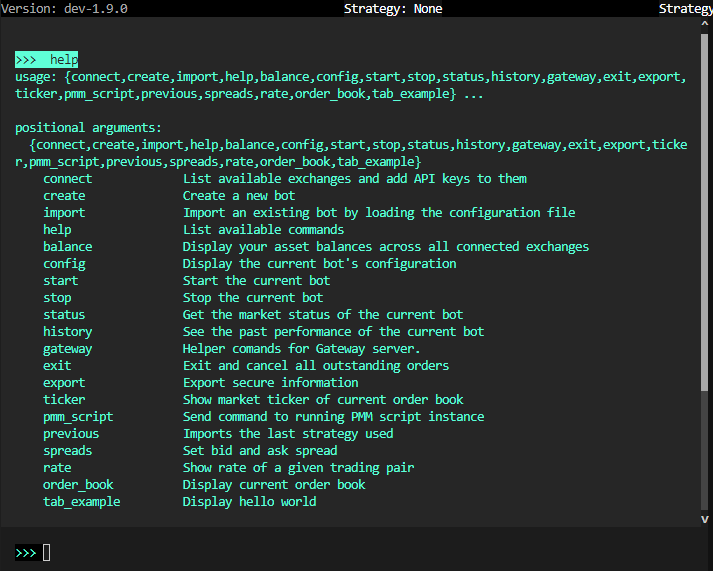
根据 Hummingbot 客户端的使用情况,您可能需要向客户端添加新命令。这可以通过在 hummingbot/client/command 目录中添加一个新的命令类来实现。
新的命令类应命名为 <command_name>_command.py
新类的名称应为 <CommandName>Command,并遵循驼峰命名法(CamelCase)。
新类应包含一个名为 command_name 的函数,当在 Hummingbot 客户端中调用该命令时,此函数将被执行。
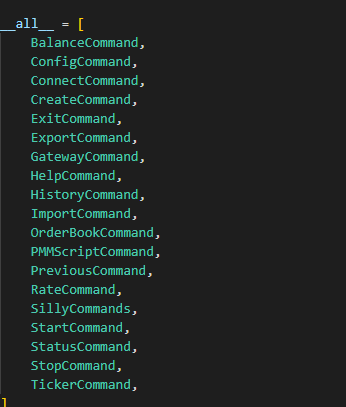
将新类添加到 hummingbot/client/command 目录下的 __init__.py 文件中,并在 __init__.py 文件中添加任何必要的导入。
最后一步是添加新命令类可能需要的其他任何函数。
请注意:请检查 hummingbot/client/command 目录,查看是否有与您要添加的新命令相似的现有命令。
创建命令快捷方式
要使用此功能,请打开并配置位于 hummingbot_conf 文件夹下的 conf_client.yml 文件。
注意
在 Hummingbot 的早期版本(1.5.0 及以下)中,该文件名为 conf_global.yml。
导入代码行以创建自定义命令快捷方式。
# Command Shortcuts
# Define abbreviations for often used commands
# or batch grouped commands together

command_shortcuts:
  # Assign shortcut command
  command: spreads_refresh

  # Reference
  help: Set bid spread, ask spread, and order refresh time

  # Argument Label
  arguments: [Bid Spread, Ask Spread, Order Refresh Time]

  # Original config output with value
  output: [config bid_spread $1, config ask_spread $2, config order_refresh_time $3]
注意
自定义命令只能在导入策略后使用。
